Nginx for JavaScript Developers in 2026 and the Deployment Knowledge Gap That Keeps You From Senior Roles
📧 Subscribe to JavaScript Insights
Get the latest JavaScript tutorials, career tips, and industry insights delivered to your inbox weekly.
Every JavaScript developer can build a React frontend and a Node.js API. Far fewer can explain what happens between a user typing your domain name and your application responding. That gap, the space between "it works on localhost" and "it works in production for 10,000 concurrent users," is where Nginx lives. And it is one of the most common reasons developers get rejected for senior roles.
I review job postings daily on jsgurujobs.com, and deployment knowledge shows up in roughly 40% of senior JavaScript positions. Not as "must know Nginx" specifically, but as phrases like "experience deploying production applications," "understanding of web server configuration," and "familiar with reverse proxy and load balancing." These are Nginx skills described in different words. If you have never configured a web server, you are missing a skill that hiring managers test for and that separates $120K developers from $170K developers.
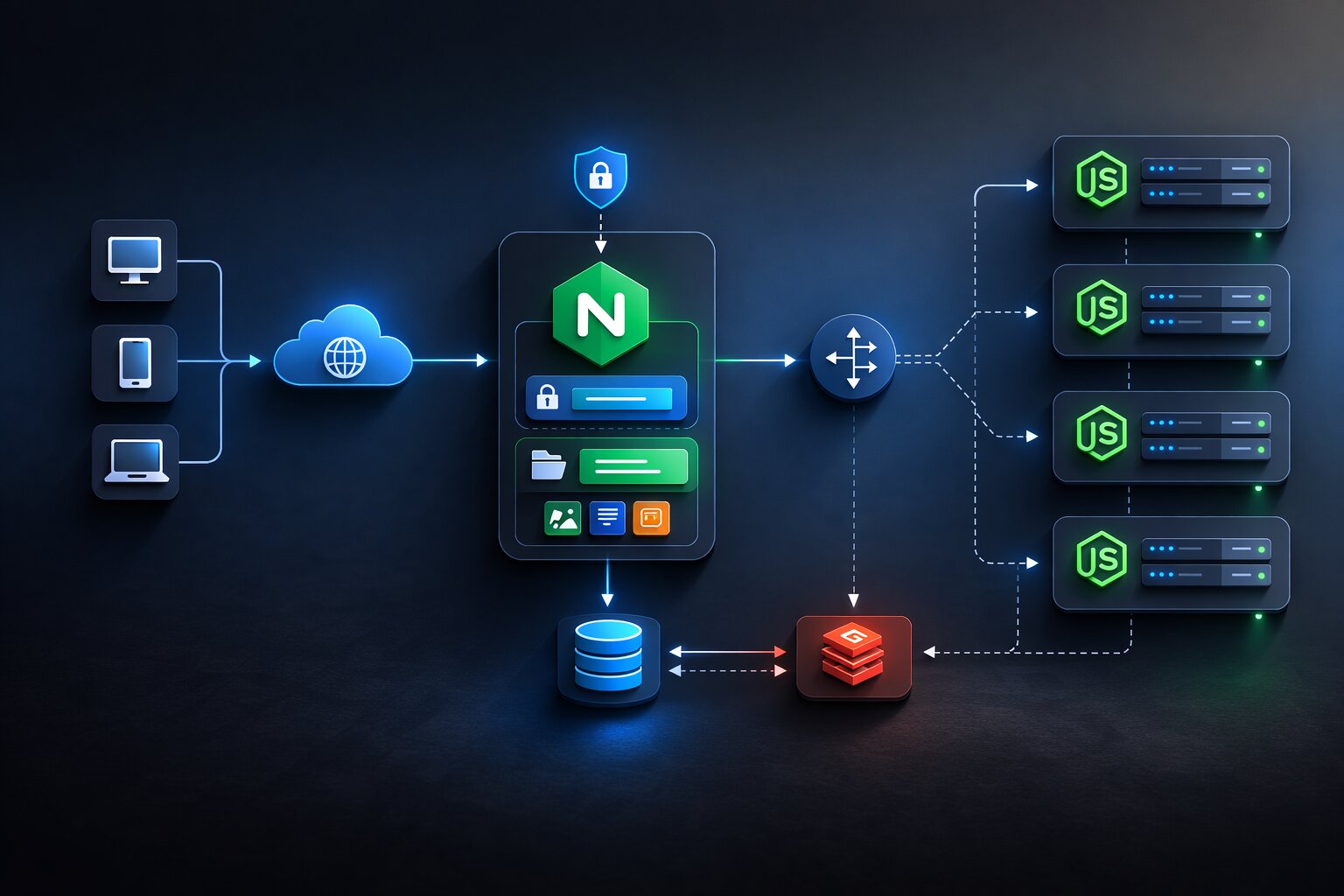
Nginx (pronounced "engine-x") serves over 34% of all websites on the internet. It sits in front of your Node.js application and handles the things Node.js should not handle: SSL termination, static file serving, request routing, load balancing, rate limiting, and compression. Your Express or Fastify server is built to run JavaScript business logic. Nginx is built to handle raw HTTP traffic at massive scale. Using Node.js to serve static files is like using a sports car to haul furniture. It technically works, but there is a better tool for the job.
Why JavaScript Developers Need to Understand Nginx in 2026
The traditional excuse was "the DevOps team handles that." In 2026, the DevOps team is gone from most companies. Teams shrank. The dedicated infrastructure person was either laid off or merged into a platform engineering role that supports multiple teams. The JavaScript developer who ships a feature is now expected to deploy it, monitor it, and fix it when the server returns 502 errors at midnight.
Even if you deploy to platforms like Vercel or Netlify that abstract away server configuration, understanding what those platforms do under the hood makes you a better debugger, a better architect, and a more valuable team member. When your Vercel deployment fails with a mysterious timeout, knowing that there is a reverse proxy between the user and your application helps you diagnose whether the problem is in your code, in the proxy configuration, or in the network.
For developers building applications that outgrow platform-as-a-service solutions, Nginx knowledge is the bridge between "I deploy to Vercel" and "I deploy to any server anywhere." Companies with custom infrastructure, compliance requirements, or cost constraints that make Vercel impractical need developers who can configure a production web server. These roles pay more because fewer developers can fill them. The infrastructure skills gap that costs JavaScript developers senior roles starts with not knowing how a web server works.
How Nginx Works as a Reverse Proxy for Node.js Applications
A reverse proxy sits between the internet and your application. Users connect to Nginx. Nginx connects to your Node.js server. Your Node.js server never speaks directly to the internet. This architecture provides security (your application is not exposed directly), performance (Nginx handles static files and compression), and reliability (Nginx can retry failed requests and distribute load across multiple instances).
The Basic Reverse Proxy Configuration
Here is the minimal Nginx configuration that puts Nginx in front of a Node.js application running on port 3000:
# /etc/nginx/sites-available/myapp
server {
    listen 80;
    server_name myapp.com www.myapp.com;

    location / {
        proxy_pass http://127.0.0.1:3000;
        proxy_http_version 1.1;
        proxy_set_header Upgrade $http_upgrade;
        proxy_set_header Connection 'upgrade';
        proxy_set_header Host $host;
        proxy_set_header X-Real-IP $remote_addr;
        proxy_set_header X-Forwarded-For $proxy_add_x_forwarded_for;
        proxy_set_header X-Forwarded-Proto $scheme;
        proxy_cache_bypass $http_upgrade;
    }
}
The proxy_pass directive tells Nginx to forward all requests to your Node.js application on port 3000. The proxy_set_header lines pass important information to your application: the real client IP address (not Nginx's IP), the original protocol (HTTP or HTTPS), and WebSocket upgrade headers. Without these headers, your Node.js application sees every request as coming from 127.0.0.1 and cannot distinguish between HTTP and HTTPS.
The WebSocket headers (Upgrade and Connection) are critical for JavaScript applications that use real-time features. Socket.io, WebSocket connections, and Server-Sent Events all require these headers to work through the reverse proxy. If you skip these lines and your chat feature or live notification system breaks in production but works in development, this is why.
Enabling the Configuration
# Create symbolic link to enable the site
sudo ln -s /etc/nginx/sites-available/myapp /etc/nginx/sites-enabled/

# Test configuration for syntax errors
sudo nginx -t

# Reload Nginx to apply changes
sudo systemctl reload nginx
Always run nginx -t before reloading. A syntax error in your configuration file will take down Nginx entirely, killing all sites on the server. The test command catches errors before they cause outages. This is the single most important Nginx habit to develop.
SSL and HTTPS Configuration With Let's Encrypt
Every production website in 2026 must serve traffic over HTTPS. Google penalizes HTTP sites in search rankings. Browsers show scary warnings. And any application that handles user data without encryption is a liability. Let's Encrypt provides free SSL certificates that auto-renew, and Certbot makes the setup almost automatic.
Installing Certbot and Getting a Certificate
# Install Certbot with Nginx plugin
sudo apt install certbot python3-certbot-nginx

# Get certificate and auto-configure Nginx
sudo certbot --nginx -d myapp.com -d www.myapp.com
Certbot modifies your Nginx configuration automatically, adding SSL certificate paths, HTTPS redirect, and security headers. After running Certbot, your configuration looks like this:
server {
    listen 80;
    server_name myapp.com www.myapp.com;
    return 301 https://$server_name$request_uri;
}

server {
    listen 443 ssl http2;
    server_name myapp.com www.myapp.com;

    ssl_certificate /etc/letsencrypt/live/myapp.com/fullchain.pem;
    ssl_certificate_key /etc/letsencrypt/live/myapp.com/privkey.pem;
    ssl_protocols TLSv1.2 TLSv1.3;
    ssl_ciphers ECDHE-ECDSA-AES128-GCM-SHA256:ECDHE-RSA-AES128-GCM-SHA256;
    ssl_prefer_server_ciphers off;

    # HSTS header - tells browsers to always use HTTPS
    add_header Strict-Transport-Security "max-age=63072000" always;

    location / {
        proxy_pass http://127.0.0.1:3000;
        proxy_http_version 1.1;
        proxy_set_header Upgrade $http_upgrade;
        proxy_set_header Connection 'upgrade';
        proxy_set_header Host $host;
        proxy_set_header X-Real-IP $remote_addr;
        proxy_set_header X-Forwarded-For $proxy_add_x_forwarded_for;
        proxy_set_header X-Forwarded-Proto $scheme;
    }
}
The first server block redirects all HTTP traffic to HTTPS. The second block handles HTTPS traffic with the SSL certificate. The http2 flag enables HTTP/2 which multiplexes multiple requests over a single connection, significantly improving page load times for JavaScript applications that load many small files.
Auto-Renewal Setup
Let's Encrypt certificates expire every 90 days. Certbot installs a cron job that auto-renews them, but verify it works:
# Test renewal process
sudo certbot renew --dry-run

# Verify the timer is active
sudo systemctl status certbot.timer
If the dry run succeeds, your certificates will renew automatically forever. If it fails, the most common cause is that port 80 is blocked or your DNS does not point to the server. Fix these before your certificate expires or your site goes down with a scary browser warning.
Serving Static Files Through Nginx Instead of Node.js
This is the single biggest performance win most JavaScript developers miss. Node.js is single-threaded. Every request it handles, including requests for JavaScript bundles, CSS files, images, and fonts, occupies the event loop. Nginx serves static files from disk without touching Node.js, freeing your application to handle only API requests and server-rendered pages.
server {
    listen 443 ssl http2;
    server_name myapp.com;

    # SSL config omitted for brevity

    # Serve static files directly from Nginx
    location /static/ {
        alias /var/www/myapp/public/static/;
        expires 1y;
        add_header Cache-Control "public, immutable";
        access_log off;
    }

    # Serve Next.js static assets
    location /_next/static/ {
        alias /var/www/myapp/.next/static/;
        expires 1y;
        add_header Cache-Control "public, immutable";
        access_log off;
    }

    # Serve uploaded files
    location /uploads/ {
        alias /var/www/myapp/uploads/;
        expires 30d;
        add_header Cache-Control "public";
    }

    # Everything else goes to Node.js
    location / {
        proxy_pass http://127.0.0.1:3000;
        proxy_http_version 1.1;
        proxy_set_header Host $host;
        proxy_set_header X-Real-IP $remote_addr;
        proxy_set_header X-Forwarded-For $proxy_add_x_forwarded_for;
        proxy_set_header X-Forwarded-Proto $scheme;
    }
}
The expires 1y and Cache-Control "public, immutable" headers tell browsers to cache these files for one year and never re-request them. Since Next.js and most JavaScript bundlers include content hashes in filenames (like main.abc123.js), the filename changes whenever the content changes, which means browsers always get the latest version after a deployment while caching everything between deployments.
The access_log off directive stops Nginx from logging every static file request. On a busy site, static file requests outnumber API requests 10 to 1. Logging all of them fills your disk and slows down Nginx without providing useful information.
The performance difference is measurable. A Node.js server handling both API requests and static files might sustain 1,000 concurrent connections before response times degrade. The same Node.js server behind Nginx, with Nginx handling static files, sustains 5,000 to 10,000 concurrent connections because Node.js only processes the API requests which are a fraction of total traffic.
Gzip and Brotli Compression in Nginx
Compression reduces the size of HTTP responses, which directly reduces page load time. A 500KB JavaScript bundle compresses to roughly 150KB with Gzip and 120KB with Brotli. For users on mobile networks, this is the difference between a 2-second load and a 0.5-second load.
# Gzip compression
gzip on;
gzip_vary on;
gzip_min_length 1000;
gzip_proxied any;
gzip_comp_level 6;
gzip_types
    text/plain
    text/css
    text/javascript
    application/javascript
    application/json
    application/xml
    image/svg+xml;

# Brotli compression (requires ngx_brotli module)
brotli on;
brotli_comp_level 6;
brotli_types
    text/plain
    text/css
    text/javascript
    application/javascript
    application/json
    application/xml
    image/svg+xml;
Gzip is supported by every browser and is the minimum you should enable. Brotli is newer, compresses 15-20% better than Gzip, and is supported by all modern browsers. If you can install the Brotli module, use both. Nginx serves Brotli to browsers that support it and falls back to Gzip for the rest.
The gzip_comp_level 6 is a sweet spot between compression ratio and CPU usage. Level 1 compresses fast but poorly. Level 9 compresses maximally but uses significant CPU. Level 6 gets about 95% of the compression of level 9 at about 50% of the CPU cost.
Load Balancing Multiple Node.js Instances
A single Node.js process uses one CPU core. If your server has 4 cores, three of them sit idle while one handles all requests. Nginx load balancing distributes traffic across multiple Node.js instances, utilizing all available CPU cores.
# Define upstream servers
upstream nodejs_app {
    least_conn;
    server 127.0.0.1:3000;
    server 127.0.0.1:3001;
    server 127.0.0.1:3002;
    server 127.0.0.1:3003;
}

server {
    listen 443 ssl http2;
    server_name myapp.com;

    location / {
        proxy_pass http://nodejs_app;
        proxy_http_version 1.1;
        proxy_set_header Host $host;
        proxy_set_header X-Real-IP $remote_addr;
        proxy_set_header X-Forwarded-For $proxy_add_x_forwarded_for;
        proxy_set_header X-Forwarded-Proto $scheme;
    }
}
The least_conn directive routes each request to the server with the fewest active connections. This is better than the default round-robin for JavaScript applications because API requests have varying response times. A slow database query on one instance does not cause the next request to queue behind it.
Running Multiple Node.js Instances With PM2
PM2 is the standard process manager for Node.js in production. It starts multiple instances of your application, restarts them if they crash, and provides monitoring.
# Install PM2 globally
npm install -g pm2

# Start 4 instances (one per CPU core)
pm2 start server.js -i 4 --name myapp

# Or auto-detect CPU cores
pm2 start server.js -i max --name myapp

# Save the process list so it survives server restart
pm2 save
pm2 startup
# Monitor all instances
pm2 monit

# View logs
pm2 logs myapp

# Restart all instances with zero downtime
pm2 reload myapp
The pm2 reload command is critical for deployments. It restarts instances one at a time, waiting for each new instance to be ready before stopping the old one. Users never see downtime. This is zero-downtime deployment without Kubernetes, without Docker Swarm, and without any complex orchestration. Just Nginx, PM2, and a deploy script.
Rate Limiting and Security Headers in Nginx
Nginx can protect your application from abuse before malicious requests even reach your Node.js code. This is more efficient than rate limiting in your application because Nginx rejects bad requests at the connection level without consuming Node.js resources.
Rate Limiting Configuration
# Define rate limiting zone (10 requests per second per IP)
limit_req_zone $binary_remote_addr zone=api:10m rate=10r/s;
limit_req_zone $binary_remote_addr zone=login:10m rate=3r/s;

server {
    listen 443 ssl http2;
    server_name myapp.com;

    # Apply strict rate limiting to authentication endpoints
    location /api/auth/ {
        limit_req zone=login burst=5 nodelay;
        limit_req_status 429;
        proxy_pass http://nodejs_app;
    }

    # Apply standard rate limiting to API
    location /api/ {
        limit_req zone=api burst=20 nodelay;
        limit_req_status 429;
        proxy_pass http://nodejs_app;
    }

    # No rate limiting for static files
    location /static/ {
        alias /var/www/myapp/public/static/;
        expires 1y;
    }

    location / {
        proxy_pass http://nodejs_app;
    }
}
The burst=20 parameter allows short traffic spikes. If a user sends 25 requests in one second, the first 20 are processed immediately and 5 get rate-limited. Without burst, anything above 10 per second is immediately rejected, which can break legitimate usage patterns like single-page applications that load multiple API endpoints on page load.
Security Headers
# Add security headers to all responses
add_header X-Frame-Options "SAMEORIGIN" always;
add_header X-Content-Type-Options "nosniff" always;
add_header X-XSS-Protection "1; mode=block" always;
add_header Referrer-Policy "strict-origin-when-cross-origin" always;
add_header Content-Security-Policy "default-src 'self'; script-src 'self' 'unsafe-inline' 'unsafe-eval'; style-src 'self' 'unsafe-inline';" always;
add_header Permissions-Policy "camera=(), microphone=(), geolocation=()" always;
These headers protect against clickjacking (X-Frame-Options), MIME type sniffing attacks (X-Content-Type-Options), and cross-site scripting (Content-Security-Policy). For JavaScript developers who understand web security at the application level, these Nginx headers add a second layer of defense that works even if your application code has a vulnerability.
Deploying a Next.js Application With Nginx
Next.js is the most common React framework in 2026, and deploying it to a server with Nginx requires understanding how Next.js handles server-side rendering, API routes, and static assets differently.
Next.js Standalone Build
# Build Next.js in standalone mode
# next.config.js: output: 'standalone'
npm run build

# The build output is in .next/standalone
# Copy static files
cp -r .next/static .next/standalone/.next/static
cp -r public .next/standalone/public
Nginx Configuration for Next.js
upstream nextjs {
    server 127.0.0.1:3000;
}

server {
    listen 443 ssl http2;
    server_name myapp.com;

    # SSL configuration
    ssl_certificate /etc/letsencrypt/live/myapp.com/fullchain.pem;
    ssl_certificate_key /etc/letsencrypt/live/myapp.com/privkey.pem;

    # Next.js static files
    location /_next/static/ {
        alias /var/www/myapp/.next/static/;
        expires 1y;
        add_header Cache-Control "public, immutable";
        access_log off;
    }

    # Public directory files (favicon, robots.txt, images)
    location /public/ {
        alias /var/www/myapp/public/;
        expires 30d;
        add_header Cache-Control "public";
        access_log off;
    }

    # API routes and SSR pages go to Next.js
    location / {
        proxy_pass http://nextjs;
        proxy_http_version 1.1;
        proxy_set_header Upgrade $http_upgrade;
        proxy_set_header Connection 'upgrade';
        proxy_set_header Host $host;
        proxy_set_header X-Real-IP $remote_addr;
        proxy_set_header X-Forwarded-For $proxy_add_x_forwarded_for;
        proxy_set_header X-Forwarded-Proto $scheme;

        # Increase timeouts for SSR pages that query databases
        proxy_read_timeout 60s;
        proxy_connect_timeout 10s;
    }
}
The proxy_read_timeout 60s is important for Next.js applications with server-side rendering. Some pages query databases or external APIs during rendering, which can take several seconds. The default Nginx timeout of 30 seconds is often too short for complex SSR pages. Set it high enough that legitimate pages complete but low enough that hung requests do not accumulate.
A Complete Deployment Script for JavaScript Applications
Putting it all together, here is a deployment script that handles the full workflow from code push to production with zero downtime:
#!/bin/bash
# deploy.sh - Zero-downtime deployment for Node.js/Next.js

set -e  # Exit on any error

APP_DIR="/var/www/myapp"
REPO="git@github.com:yourname/myapp.git"
BRANCH="main"

echo "Starting deployment..."

# Pull latest code
cd $APP_DIR
git fetch origin $BRANCH
git reset --hard origin/$BRANCH

# Install dependencies
npm ci --production

# Build the application
npm run build

# Run database migrations if needed
npx prisma migrate deploy

# Reload application with zero downtime
pm2 reload myapp

# Verify the application is healthy
sleep 5
HTTP_STATUS=$(curl -s -o /dev/null -w "%{http_code}" https://myapp.com/api/health)

if [ "$HTTP_STATUS" -eq 200 ]; then
    echo "Deployment successful! Health check returned 200."
else
    echo "WARNING: Health check returned $HTTP_STATUS. Rolling back..."
    git reset --hard HEAD~1
    npm ci --production
    npm run build
    pm2 reload myapp
    echo "Rolled back to previous version."
    exit 1
fi

echo "Deployment completed at $(date)"
The health check at the end is what separates a professional deployment from a amateur one. After deploying, the script verifies that the application actually works by hitting a health endpoint. If the health check fails, it automatically rolls back to the previous version. This prevents the scenario where a broken deployment stays live because nobody noticed at 3 AM.
For teams that have their CI/CD pipelines configured with GitHub Actions, this deployment script can be triggered automatically after tests pass, giving you fully automated deployments with rollback protection.
Nginx Logging and Monitoring for Production JavaScript Applications
Understanding Nginx logs is essential for debugging production issues. Nginx writes two log files by default: an access log (every request) and an error log (problems and warnings).
Custom Log Format for JavaScript Applications
The default Nginx log format lacks useful information for debugging JavaScript applications. A custom format that includes response time, upstream response time, and cache status gives you much better visibility:
# Custom log format
log_format detailed '$remote_addr - $remote_user [$time_local] '
                    '"$request" $status $body_bytes_sent '
                    '"$http_referer" "$http_user_agent" '
                    'rt=$request_time urt=$upstream_response_time '
                    'cache=$upstream_cache_status';

access_log /var/log/nginx/myapp.access.log detailed;
error_log /var/log/nginx/myapp.error.log warn;
The request_time shows how long Nginx took to serve the response (including waiting for Node.js). The upstream_response_time shows how long Node.js took to process the request. If request_time is 2 seconds and upstream_response_time is 1.8 seconds, the bottleneck is your application code. If request_time is 2 seconds and upstream_response_time is 0.1 seconds, the bottleneck is the network or Nginx configuration.
Log Rotation to Prevent Disk Full
Nginx logs grow continuously. A moderately busy JavaScript application generates 1-5GB of logs per month. Without log rotation, logs fill the disk and crash the server.
# /etc/logrotate.d/nginx
/var/log/nginx/*.log {
    daily
    missingok
    rotate 14
    compress
    delaycompress
    notifempty
    create 0640 www-data adm
    sharedscripts
    postrotate
        [ -f /var/run/nginx.pid ] && kill -USR1 `cat /var/run/nginx.pid`
    endscript
}
This rotates logs daily, keeps 14 days of history, and compresses old logs. The kill -USR1 signal tells Nginx to reopen its log files without restarting, so no requests are dropped during rotation.
Real-Time Monitoring With Nginx Stub Status
Enable the stub status module to get real-time connection statistics:
location /nginx_status {
    stub_status;
    allow 127.0.0.1;
    deny all;
}
This exposes a simple status page at /nginx_status that shows active connections, requests per second, and connection states. It is only accessible from localhost for security. You can query it from your monitoring system or a simple script:
# Check Nginx status
curl http://127.0.0.1/nginx_status

# Output:
# Active connections: 43
# server accepts handled requests
#  1234567 1234567 2345678
# Reading: 2 Writing: 5 Waiting: 36
If "Active connections" is consistently high (hundreds or thousands) and "Waiting" dominates, your Node.js application is slow and connections are backing up. If "Reading" is high, clients are sending data slowly (possibly a DDoS attack or clients on slow networks).
Nginx With Docker for JavaScript Applications
Many JavaScript teams deploy with Docker in 2026. Nginx works excellently as a Docker container, either as a separate container in front of your Node.js container or as part of a multi-stage Docker build.
Docker Compose With Nginx and Node.js
# docker-compose.yml
version: '3.8'

services:
  nginx:
    image: nginx:alpine
    ports:
      - "80:80"
      - "443:443"
    volumes:
      - ./nginx/conf.d:/etc/nginx/conf.d
      - ./nginx/ssl:/etc/nginx/ssl
      - ./public:/var/www/public
    depends_on:
      - app
    restart: unless-stopped

  app:
    build: .
    expose:
      - "3000"
    environment:
      - NODE_ENV=production
      - DATABASE_URL=${DATABASE_URL}
    restart: unless-stopped

  db:
    image: postgres:16-alpine
    volumes:
      - pgdata:/var/lib/postgresql/data
    environment:
      - POSTGRES_DB=myapp
      - POSTGRES_PASSWORD=${DB_PASSWORD}
    restart: unless-stopped

volumes:
  pgdata:
The key detail is that the Node.js app uses expose (internal only) instead of ports (external). Only Nginx has external port mappings. The app container is not accessible from the internet, which is exactly what we want for security.
The Nginx configuration in Docker references the app container by its service name instead of localhost:
# nginx/conf.d/default.conf
upstream app {
    server app:3000;
}

server {
    listen 80;
    server_name myapp.com;

    location / {
        proxy_pass http://app;
        proxy_set_header Host $host;
        proxy_set_header X-Real-IP $remote_addr;
        proxy_set_header X-Forwarded-For $proxy_add_x_forwarded_for;
        proxy_set_header X-Forwarded-Proto $scheme;
    }

    location /static/ {
        alias /var/www/public/static/;
        expires 1y;
        add_header Cache-Control "public, immutable";
    }
}
Docker's internal DNS resolves app to the Node.js container's IP address. If you scale the app service (docker-compose up --scale app=4), Nginx automatically distributes requests across all 4 instances using the upstream block.
Nginx Performance Tuning for High-Traffic JavaScript Applications
The default Nginx configuration handles moderate traffic well. For applications serving thousands of concurrent users, tuning the worker configuration and connection handling makes a significant difference.
Worker Processes and Connections
# /etc/nginx/nginx.conf
worker_processes auto;  # One worker per CPU core
worker_rlimit_nofile 65535;

events {
    worker_connections 4096;
    multi_accept on;
    use epoll;
}

http {
    sendfile on;
    tcp_nopush on;
    tcp_nodelay on;
    keepalive_timeout 65;
    keepalive_requests 1000;
    types_hash_max_size 2048;
}
worker_processes auto creates one worker process per CPU core. worker_connections 4096 allows each worker to handle 4,096 simultaneous connections. With 4 CPU cores, Nginx handles 16,384 concurrent connections, which is more than enough for most JavaScript applications.
sendfile on uses the kernel's sendfile system call to serve static files without copying data through user space. This is significantly faster for static file serving and reduces CPU usage. tcp_nopush and tcp_nodelay optimize TCP packet handling for better throughput.
Proxy Buffering for Node.js
By default, Nginx buffers responses from upstream servers. For most API responses this is fine. For Server-Sent Events and streaming responses, buffering must be disabled:
# Default: buffering on (good for regular API responses)
location /api/ {
    proxy_pass http://nodejs_app;
    proxy_buffering on;
    proxy_buffer_size 4k;
    proxy_buffers 8 4k;
}

# SSE and streaming: buffering off
location /api/events/ {
    proxy_pass http://nodejs_app;
    proxy_buffering off;
    proxy_cache off;
    proxy_set_header Connection '';
    proxy_http_version 1.1;
    chunked_transfer_encoding off;
}
If you have ever wondered why your Server-Sent Events work in development but arrive in batches in production, proxy buffering is almost certainly the cause. Nginx collects the response in a buffer and sends it to the client in chunks rather than streaming individual events. Disabling buffering for SSE endpoints fixes this immediately.
Common Nginx Mistakes JavaScript Developers Make
After helping developers debug production issues on jsgurujobs.com and other projects, I see the same Nginx mistakes repeatedly.
Not Increasing Client Max Body Size
The default client_max_body_size in Nginx is 1MB. If your application accepts file uploads (resumes, images, documents), any upload larger than 1MB fails with a 413 error. Your Node.js application never sees the request because Nginx rejects it before forwarding.
# Allow uploads up to 10MB
client_max_body_size 10m;
Not Configuring Timeouts for Long Requests
Nginx closes connections that take too long. If your API has endpoints that process large datasets, generate reports, or call slow external services, the default 60-second timeout might not be enough.
location /api/reports/ {
    proxy_pass http://nodejs_app;
    proxy_read_timeout 120s;
    proxy_send_timeout 120s;
}
Set longer timeouts only for specific endpoints that need them. Do not increase the global timeout because that allows slow or malicious requests to hold connections open longer.
Not Handling 502 and 504 Errors Gracefully
When your Node.js application crashes or restarts, Nginx returns a 502 Bad Gateway error. The default 502 page is an ugly Nginx default page that makes your application look broken. Create a custom error page that tells users to try again.
error_page 502 503 504 /50x.html;

location = /50x.html {
    root /var/www/myapp/public/errors;
    internal;
}
Create a simple HTML page at /var/www/myapp/public/errors/50x.html that matches your application's design and says "We're updating the application. Please try again in a few seconds." This turns a scary error into a minor inconvenience.
Nginx vs Other Options for JavaScript Developers
Nginx is not the only reverse proxy available. Here is how it compares to alternatives JavaScript developers encounter in 2026.
Nginx vs Caddy
Caddy is a newer web server that handles SSL automatically without Certbot and has simpler configuration syntax. For small projects and personal sites, Caddy is genuinely easier to set up. You can configure a reverse proxy with SSL in four lines of Caddy configuration versus 30 lines of Nginx. For production applications with custom routing, load balancing, rate limiting, and performance requirements, Nginx is more mature, has better documentation, and has a larger ecosystem of modules and tutorials. If you are deploying a side project, Caddy saves time and reduces configuration errors. If you are deploying a production application that serves thousands of users and needs fine-grained control over caching, compression, and security headers, learn Nginx.
Nginx vs Traefik
Traefik is designed for containerized environments and integrates deeply with Docker and Kubernetes. If your application runs in Docker, Traefik automatically discovers new containers, configures routing, and obtains SSL certificates without any manual configuration. When you scale your Node.js service from 2 to 8 containers, Traefik automatically starts load balancing across all 8. For Docker-based deployments, Traefik is often a better choice than Nginx because the automation reduces operational overhead. For traditional server deployments without Docker, Nginx is simpler and more predictable because it does not need a container orchestrator to function.
Nginx vs Using Node.js Directly
Some developers skip the reverse proxy entirely and expose Node.js directly to the internet. This works for development and tiny hobby applications but is a genuinely bad idea for production. Node.js does not handle SSL termination efficiently because the TLS handshake blocks the event loop. Node.js does not serve static files efficiently because reading from disk occupies the event loop that should be running your business logic. Node.js cannot load balance across multiple instances without a separate process manager. And Node.js provides no protection against slow or malicious requests that hold connections open and exhaust your server's resources. Nginx exists specifically because web servers need capabilities that application servers should not implement. Combining both gives you the best of each.
Nginx vs Cloud Load Balancers
If your application runs on AWS, GCP, or Azure, you have access to cloud load balancers (AWS ALB, GCP Cloud Load Balancing). These services handle SSL, routing, and load balancing without managing Nginx yourself. For cloud-native applications, cloud load balancers are often the right choice because they integrate with auto-scaling and managed services. But they cost more than Nginx on a VPS, they lock you into a specific cloud provider, and they provide less control over caching and compression. Many production architectures use a cloud load balancer at the edge plus Nginx on each server for fine-grained control. Understanding Nginx helps you configure and debug both approaches.
Nginx Knowledge in Job Postings and Career Impact
Deployment and server configuration skills appear in a growing percentage of JavaScript job postings. The trend is clear: as teams get smaller, each developer is expected to handle more of the stack. The developer who can configure Nginx, set up SSL, optimize static file serving, and deploy with zero downtime is the developer who gets the senior title and the salary that comes with it.
When I review job postings on jsgurujobs.com, the pattern is consistent. Junior roles never mention Nginx or deployment. Mid-level roles occasionally mention "experience deploying applications." Senior roles almost always include some variation of "production deployment experience," "web server configuration," or "understanding of reverse proxy and load balancing." The skill is not tested at junior level, expected at mid-level, and required at senior level. Learning it before you need it puts you ahead of developers who scramble to learn when they get promoted and suddenly need to deploy their first production application.
The interview signal is equally strong. When a senior candidate describes their deployment setup with specifics like "Nginx with SSL termination, PM2 for process management, and a health-check deployment script with automatic rollback," the interviewer hears someone who has operated real production systems. When a candidate says "I deploy to Vercel," the interviewer hears someone who has used a tool but may not understand the underlying infrastructure. Both deploy applications. Only one demonstrates the depth of understanding that senior roles require.
For developers building their technical skills across the full infrastructure stack, Nginx is one of the most practical additions you can make. Unlike Kubernetes which takes months to learn and is overkill for most projects, Nginx can be learned in a weekend and applied immediately to any project that runs on a server. Unlike cloud-specific services that lock you into AWS or GCP, Nginx runs anywhere. A VPS in DigitalOcean, a dedicated server in Hetzner, an on-premises machine in an office closet. The skill is universal and portable.
The best way to learn Nginx is to deploy something real. Take a side project that currently runs on localhost, rent a $5 VPS, install Nginx, configure the reverse proxy, set up SSL with Certbot, and serve it to the world. The entire process takes 2 to 3 hours for your first time and 20 minutes once you have done it before. That 2 to 3 hours of learning produces a skill that appears on your resume, comes up in every senior interview, and separates you from the thousands of JavaScript developers who can build applications but cannot deploy them independently.
The best way to learn Nginx is to deploy something. Take a side project that currently runs on localhost, rent a $5 VPS from DigitalOcean or Hetzner, install Nginx, configure the reverse proxy, set up SSL with Certbot, and serve it to the world. The entire process takes 2 to 3 hours for your first time and 20 minutes once you have done it before. That 2 to 3 hours of learning produces a skill that appears on your resume, comes up in interviews, and separates you from developers who can only deploy to Vercel.
If you want to keep track of which infrastructure skills are appearing in JavaScript job postings, I share this data weekly at jsgurujobs.com.
FAQ
Do I need Nginx if I deploy to Vercel or Netlify?
No. Vercel and Netlify handle reverse proxying, SSL, CDN, and static file serving automatically. You need Nginx when you deploy to a VPS, a cloud server (EC2, DigitalOcean), or any environment where you manage your own infrastructure. Understanding Nginx still helps you debug issues on any platform because the concepts (reverse proxy, SSL termination, caching headers) apply everywhere.
Should I use Nginx or Apache for a Node.js application?
Nginx. Apache uses a thread-per-connection model that consumes more memory under high load. Nginx uses an event-driven model similar to Node.js itself, handling thousands of connections with minimal memory. Apache is still widely used for PHP applications, but for Node.js reverse proxying, Nginx is the standard choice in 2026.
How do I debug a 502 Bad Gateway error with Nginx and Node.js?
Check three things in order. First, verify your Node.js application is actually running with pm2 status or curl http://127.0.0.1:3000 directly. Second, check Nginx error logs at /var/log/nginx/error.log for connection refused or timeout messages. Third, verify the proxy_pass port in your Nginx config matches the port your Node.js application listens on. 90% of 502 errors are caused by the application not running or a port mismatch.
Can Nginx replace a CDN like CloudFront?
Not fully. Nginx serves content from one server location. A CDN serves content from edge servers worldwide. For users close to your server, Nginx is fast enough. For global audiences, you want both: CloudFront or Cloudflare in front of Nginx, caching static files at edge locations while Nginx handles dynamic requests from the origin server.
Share this article