How JavaScript Developers Make Technical Decisions in 2026 and the Framework for Choosing Libraries Tools and Architecture Without Regret
📧 Subscribe to JS Pulse
The JavaScript job market in one email: real numbers from 600+ job listings, 5 jobs worth applying to, and what actually changed. Join 9,000+ developers.
A team I talked to last month spent three weeks evaluating state management libraries. They compared Redux Toolkit, Zustand, Jotai, Valtio, and Recoil. They built proof-of-concept implementations in each. They wrote a 12-page document with benchmark results. Then they picked Zustand, which is what they would have picked in day one if they had a decision framework instead of analysis paralysis. Three weeks of engineering time burned on a decision that should have taken two hours.
This is the most expensive pattern in JavaScript development in 2026. Not choosing the wrong tool. Choosing the wrong process for choosing tools. The JavaScript ecosystem has more libraries, frameworks, and tools than any other programming language ecosystem. npm has over 2.5 million packages. Every category has 5-10 competing options. React or Vue or Svelte. Prisma or Drizzle or Knex. Jest or Vitest or Playwright. Express or Fastify or Hono. The options multiply every year and the cost of choosing wrong, or choosing slowly, compounds.
I run jsgurujobs.com and see this pattern in every company that posts JavaScript roles. The job description says "experience making technical decisions" or "ability to evaluate and select tools." On the surface this sounds vague. In practice, it is the single most important skill that separates senior developers from mid-level developers. A mid-level developer can use any tool you hand them. A senior developer can decide which tool the team should use, explain why, and live with the consequences.
This article is the decision framework I wish someone had given me five years ago. Not "use React" or "use Zustand." The process for evaluating any technical choice so you make good decisions fast and do not regret them six months later.
Why Technical Decision Making Is the Highest-Value JavaScript Skill in 2026
AI can write code. AI can fix bugs. AI can generate components, API routes, and database queries. What AI cannot do is decide which database to use for your specific project, whether to migrate from REST to GraphQL given your team size and timeline, or whether adopting a new framework is worth the migration cost.
On jsgurujobs.com, 35% of senior and staff engineer job descriptions mention "technical decision making," "architecture decisions," or "technology selection." These roles pay $180K-$350K. The reason is simple: a bad technical decision costs far more than a bad line of code. A bad line of code costs an hour to fix. A bad framework choice costs months to undo. A bad database choice costs years to migrate away from.
In Q1 2026, with 60,000 tech layoffs and shrinking teams, every technical decision carries more weight. There are fewer people to absorb the consequences of a wrong choice. A team of 10 that picks the wrong tool can assign 2 people to fix it. A team of 3, which is increasingly common after layoffs, cannot afford to waste anyone on fixing a decision that should have been made correctly the first time.
The developers who understand what separates senior from mid-level in 2026 know that technical judgment is the core differentiator. You can teach someone React in a month. You cannot teach someone to make good decisions about when to use React and when not to.
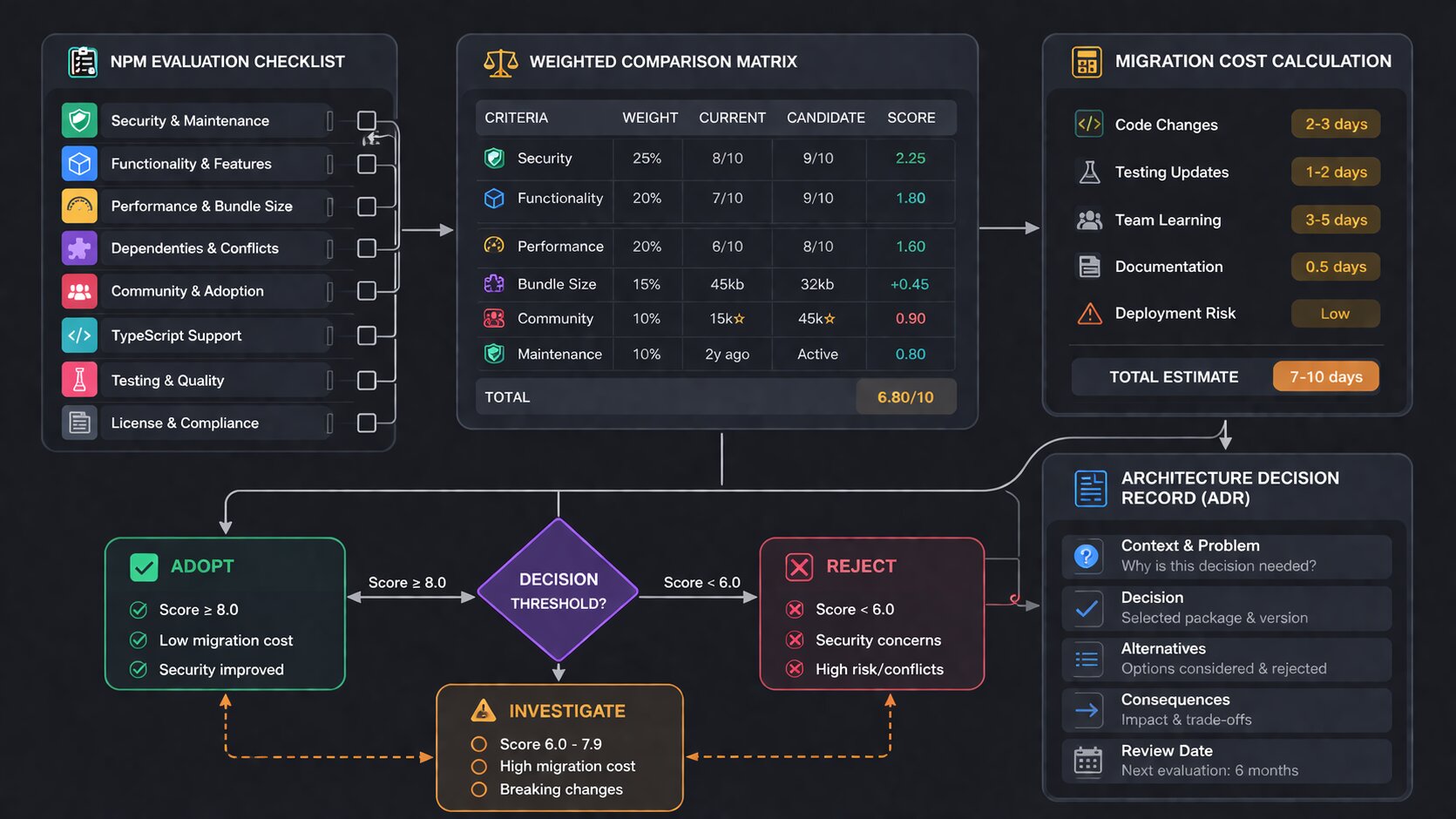
The 5-Minute npm Package Evaluation That Prevents 90% of Bad Dependency Choices
Before evaluating architecture or frameworks, start with the smallest decision: should I install this npm package? The Axios supply chain attack in March 2026 proved that every npm install is a security decision, not just a convenience decision. Here is how to evaluate any package in 5 minutes.
Check Weekly Downloads and the Trend
Go to npmjs.com and look at weekly downloads. A package with 10 million weekly downloads is battle-tested by thousands of production applications. A package with 500 weekly downloads might work perfectly but has not been stress-tested at scale. Neither number tells you the package is good. But the first number tells you that if there is a bug, someone else has probably already found and reported it.
More important than the absolute number is the trend. A package going from 1 million to 500,000 downloads over 6 months is dying. A package going from 50,000 to 200,000 is growing. Dying packages still work but they accumulate unfixed bugs, miss ecosystem updates, and eventually become abandoned. Growing packages get more contributors, more bug fixes, and more ecosystem integration.
Check the Last Commit and Issue Response Time
Go to the GitHub repository. When was the last commit? If the last commit was 2 years ago, the package is effectively abandoned. It might still work but if you find a bug, nobody is going to fix it. If the last commit was last week, the maintainers are active.
More telling than the last commit is the issue response time. Open the Issues tab, sort by newest, and look at the last 5-10 issues. Are maintainers responding within days? Or are issues sitting unanswered for months? A package with fast issue response is actively maintained. A package where issues rot for months is maintained in name only.
Check the Bundle Size
Use bundlephobia.com. Enter the package name. See the gzipped size. A date formatting library that adds 72KB to your bundle (Moment.js) is a very different choice than one that adds 2KB (date-fns/format). For server-side code, bundle size matters less. For client-side code shipped to browsers over cellular networks, every kilobyte counts.
Check the Dependency Count
A package with 0 dependencies has 0 supply chain attack surface beyond itself. A package with 15 dependencies exposes you to security and maintenance risks from 15 additional packages. After the Axios attack where a single malicious dependency compromised millions of installations, dependency count is a security metric, not just a technical one.
The 5-Minute Verdict
If the package has growing downloads, recent commits, responsive maintainers, reasonable bundle size, and few dependencies, install it. If it fails on two or more of these checks, look for an alternative or consider building the functionality yourself. This evaluation takes 5 minutes and prevents the vast majority of bad dependency decisions.
The Build vs Install Decision and When Writing Your Own Code Beats Using a Library
The JavaScript ecosystem has a cultural bias toward installing packages. Need to check if a value is an array? npm install is-array. Need to pad a string? npm install left-pad. This culture reached its breaking point years ago but the instinct remains. Not every problem needs a dependency.
When to Build
Build when the functionality is simple (under 50 lines of code), when the available packages are bloated for your use case, when security is critical and you need to audit every line, or when the functionality is core to your product's differentiation.
A date formatting function that handles 3 specific formats your application uses is 20 lines of code. Installing date-fns adds a dependency and 7KB to your bundle. For 3 formats, build it yourself. For 30 formats with timezone handling and locale support, use the library.
// 20 lines vs adding a dependency
function formatRelativeTime(date: Date): string {
    const now = new Date();
    const diffMs = now.getTime() - date.getTime();
    const diffMins = Math.floor(diffMs / 60000);
    const diffHours = Math.floor(diffMs / 3600000);
    const diffDays = Math.floor(diffMs / 86400000);

    if (diffMins < 1) return 'just now';
    if (diffMins < 60) return `${diffMins}m ago`;
    if (diffHours < 24) return `${diffHours}h ago`;
    if (diffDays < 30) return `${diffDays}d ago`;
    return date.toLocaleDateString();
}
When to Install
Install when the problem is complex (cryptography, image processing, PDF generation), when the library is battle-tested and you would spend weeks replicating its edge case handling, when the library has an active community that fixes bugs faster than you could, or when the library provides a standard that other tools in your ecosystem integrate with.
You should never write your own cryptography library. You should never write your own ORM if Prisma or Drizzle fit your needs. You should never write your own test runner if Jest or Vitest exists. The investment in getting these things right is measured in person-years, not person-days.
The Decision Heuristic
Ask one question: "If this library disappeared tomorrow, how long would it take me to replace it?" If the answer is "an hour," build it yourself. If the answer is "a week or more," use the library. This heuristic captures the complexity of the functionality and the cost of being wrong in a single question.
How to Choose Between Competing JavaScript Frameworks and Libraries
When the decision is not build vs install but which option to install, the evaluation process changes. Comparing React to Vue to Svelte is a different kind of decision than comparing a package to custom code.
Start With Constraints, Not Features
Most developers start by comparing features. React has hooks. Vue has the composition API. Svelte has reactivity. This is the wrong starting point because all modern frameworks have equivalent features. They differ in constraints.
What is your team's existing experience? A team of 5 React developers switching to Svelte means 5 developers learning a new framework while shipping features. The migration cost is months of reduced velocity. This constraint alone eliminates most framework switches.
What does your hosting environment support? If you deploy to Cloudflare Workers, your framework must support edge rendering. Next.js, Nuxt, and SvelteKit do. A custom Express + React setup does not.
What is your performance budget? If your application must load in under 1 second on 3G, your framework choice directly affects whether this is possible. Svelte at 2KB runtime beats React at 42KB.
What libraries does your ecosystem require? If you need a specific component library (shadcn, Radix), your framework choice is constrained to what those libraries support.
Constraints eliminate options. Features compare options. Always constrain first.
The Decision Matrix That Actually Works
For any technical decision with 2-4 options, create a simple matrix. Not a 50-column spreadsheet. Five rows maximum.
Decision: State management for dashboard project

Criteria (weighted):        Zustand   Redux Toolkit   Jotai
Team familiarity (30%)      8/10      10/10           3/10
Bundle size (20%)           9/10      6/10            9/10
DevTools support (20%)      7/10      10/10           5/10
Learning curve (15%)        9/10      6/10            7/10
Ecosystem maturity (15%)    8/10      10/10           6/10

Weighted total:             8.2       8.4             5.4
The weights matter more than the scores. A team that already knows Redux should weight "team familiarity" at 40%. A team building a new product from scratch should weight "learning curve" and "bundle size" higher. The weights encode your specific context, which is what makes the decision yours and not a generic blog post recommendation.
Set a Time Limit
Every technical evaluation should have a time limit. One hour for a library choice. Four hours for a framework comparison. One day for an architecture decision. When the time is up, decide with the information you have.
The reason for time limits is that additional research has diminishing returns. The first hour of evaluation eliminates obviously wrong choices. The second hour refines the comparison between top candidates. The tenth hour finds edge cases that may never affect your project. Most teams spend too long in the third category.
When to Migrate and When to Stay With What Works
The hardest technical decision is not choosing a new tool. It is deciding whether to migrate away from a working tool. Your Express API works. Fastify is faster. Should you migrate? Your REST API works. tRPC gives better type safety. Should you switch?
The Migration Cost Calculation
Every migration has a cost that is almost always underestimated. The cost includes rewriting code (which developers estimate), rewriting tests (which developers forget), debugging new behavior (which is unpredictable), reduced feature velocity during migration (which managers hate), and risk of regression bugs in production (which nobody accounts for until they happen).
A realistic migration estimate takes the developer's initial estimate and multiplies it by 2-3x. A "two-week Express to Fastify migration" takes 4-6 weeks including tests, edge cases, production debugging, and the inevitable "it worked differently in Express" issues.
The Migration Benefit Calculation
The benefit must be concrete and measurable. "Fastify is faster" is not a benefit. "Fastify reduces our P95 response time from 200ms to 80ms, which improves our Lighthouse score from 72 to 91 and reduces our bounce rate by an estimated 15%" is a benefit. If you cannot state the benefit in a specific, measurable sentence, the migration is not worth doing.
For developers focused on how performance metrics directly affect career outcomes, knowing when a migration is worth the performance gain is a career-defining skill.
The Strangler Fig Pattern for Safe Migration
If you decide to migrate, never do a big-bang rewrite. Use the strangler fig pattern: new features use the new tool, old features stay on the old tool, and you gradually migrate old features as you touch them for other reasons. An Express application can serve some routes through Fastify while keeping the rest on Express. A REST API can add tRPC for new endpoints while keeping REST for existing ones.
This pattern eliminates migration risk because the old code continues working while the new code is built alongside it. If the new approach fails, you simply stop migrating. No rollback needed.
How to Make Architecture Decisions That Survive 3 Years
Library choices affect months. Architecture decisions affect years. Choosing a microservices architecture when a monolith would work, choosing server-side rendering when a static site would suffice, or choosing a complex state management approach when React context would be enough creates years of unnecessary complexity.
Start Simple and Add Complexity Only When Proven Necessary
The best architecture for a new project is the simplest one that could work. A monolithic Next.js application. A single PostgreSQL database. Server-side rendering for pages, client-side rendering for interactive components. No microservices. No event-driven architecture. No message queues. Not yet.
Add complexity when you hit a specific, measurable wall. Your monolith cannot deploy independently? Extract the bottleneck into a service. Your PostgreSQL queries take 500ms? Add Redis caching. Your server rendering blocks the event loop? Move heavy computation to a worker.
Each complexity addition should be a response to a specific problem, not a preventive measure against a hypothetical problem. Building microservices for a project with 100 users is solving a problem you do not have with an approach that creates 10 new problems.
The Reversibility Test
Before making any architecture decision, ask: "how hard is this to reverse?" Choosing Prisma as your ORM is relatively easy to reverse because you can replace it one query at a time. Choosing microservices over a monolith is extremely hard to reverse because every service depends on the architecture.
Easy-to-reverse decisions should be made quickly with minimal analysis. Hard-to-reverse decisions deserve days of evaluation, team discussion, and possibly a proof-of-concept. The reversibility of the decision determines how much time you should spend making it.
For developers who understand JavaScript application architecture at the system design level, this reversibility test is the foundation of every architecture conversation.
How AI Changes Technical Decision Making in 2026
AI tools like Cursor, Copilot, and Claude Code introduced a new dimension to technical decisions: how well does this tool work with AI?
AI Compatibility as a Selection Criterion
Some libraries have better AI support than others. React has more training data than any other framework, which means AI tools generate better React code. Prisma has clear, declarative schema definitions that AI understands better than raw SQL query builders. TypeScript gives AI tools type information that dramatically improves code generation quality.
This does not mean you should always choose the most AI-compatible option. But when two options are otherwise equal, the one that AI tools handle better gives your team a productivity advantage. In 2026, a developer using AI with a well-supported library ships 2-3x faster than a developer using AI with an obscure library that the model barely knows.
AI Cannot Make the Decision for You
Developers increasingly ask ChatGPT or Claude "should I use Redux or Zustand?" The answer they get is usually a balanced comparison that ends with "it depends on your use case." This is correct but unhelpful. AI can list the pros and cons of each option. AI cannot weigh those pros and cons for your specific team, project, timeline, and constraints. The weighing is the decision. The decision is the human's job.
Use AI to research options faster. Ask AI to explain the tradeoffs of each approach. But make the decision yourself based on your constraints. The developer who asks AI for the decision is the developer who cannot explain why they chose what they chose when their manager asks in the next sprint review.
The Decision Log That Saves Your Future Self
Every significant technical decision should be documented in an Architecture Decision Record (ADR). This is a simple document that captures what was decided, why, what alternatives were considered, and what the expected consequences are.
# ADR-007: Use Zustand for Dashboard State Management

## Status
Accepted (2026-03-15)

## Context
The dashboard has 12 independent widgets that each manage their own
state. Some widgets share data (user filters affect all widgets).
The team has 3 frontend developers, all experienced with React.

## Decision
Use Zustand for state management.

## Alternatives Considered
- Redux Toolkit: team knows it well but boilerplate is heavy for
  this use case. Zustand achieves the same result with 60% less code.
- React Context: works for simple state but creates re-render
  performance issues with 12 widgets updating independently.
- Jotai: promising but nobody on the team has used it. Learning
  curve adds 1-2 weeks to the timeline.

## Consequences
- Team needs 2-3 days to learn Zustand patterns.
- Devtools support is less mature than Redux.
- If we need middleware (logging, persistence), Zustand supports it
  but the ecosystem is smaller than Redux.
ADRs take 15 minutes to write. They save hours of "why did we choose this?" conversations 6 months later when someone new joins the team, when the original decision maker leaves, or when you need to decide whether to migrate. The ADR tells the future reader not just what was decided but what the context was when the decision was made.
The Technical Decisions That JavaScript Interviewers Test in 2026
Senior JavaScript interviews increasingly include scenario-based decision questions. Not "what is Redux?" but "your team is building a dashboard with real-time data. How would you choose between WebSockets, Server-Sent Events, and polling?"
The expected answer is not a specific choice. It is a decision process. The interviewer wants to hear constraints first ("what is the update frequency? how many concurrent users?"), then tradeoffs ("WebSockets gives bidirectional communication but requires connection management. SSE is simpler but only server-to-client."), then a recommendation with reasoning ("for a dashboard with 1,000 concurrent users and 5-second update intervals, SSE is sufficient and simpler to implement. WebSockets would be over-engineering for this use case.").
For developers preparing for JavaScript system design interviews, every technical decision question follows the same pattern: understand constraints, evaluate tradeoffs, recommend with reasoning.
How to Make Technical Decisions in a Team Without Endless Debates
Solo developers make decisions fast because there is nobody to disagree with. Teams of 3-8 developers can spend hours in meetings debating technical choices that a solo developer would resolve in 10 minutes. The challenge is not finding the right answer. The challenge is finding the right process so that the team reaches a decision efficiently without anyone feeling steamrolled.
The Decision Owner Model
Every technical decision should have one owner. Not a committee. One person who is responsible for researching the options, consulting the team, and making the final call. The rest of the team provides input but does not have veto power. This prevents the situation where a team of 5 spends 3 hours in a meeting because each person has a different preference and nobody has the authority to break the tie.
The decision owner should be the person closest to the problem. If the decision is about the database layer, the backend developer who writes the most database code should own it. If the decision is about the component architecture, the frontend developer who maintains the design system should own it. Seniority matters for guidance but proximity to the problem matters more for decision quality.
The 30-Minute Decision Meeting
When a team needs to discuss a technical choice, cap the meeting at 30 minutes. The decision owner presents 2-3 options with a recommendation. The team asks questions and raises concerns for 15 minutes. The decision owner incorporates feedback and makes the final call. The meeting ends. If 30 minutes is not enough, the decision needs more async research before another meeting, not a longer meeting.
Write the decision in a Slack message or ADR immediately after the meeting. "We decided X because Y. Alternatives we considered: A, B. The decision is effective now." This prevents the situation where the team revisits the same decision 2 weeks later because nobody remembers what was agreed.
Disagree and Commit
Sometimes a team member disagrees with the decision. This is healthy. What is unhealthy is re-litigating the decision in every code review and standup for the next 3 months. The principle of "disagree and commit" means you voice your disagreement during the decision process, and then commit to the decision once it is made. If the decision turns out to be wrong, the team revisits it based on evidence, not based on "I told you so."
How to Make Technical Debt Decisions Without Crippling Your Team
Technical debt decisions are the hardest because they pit short-term delivery against long-term maintainability. Ship the feature with a hacky implementation now, or spend 2 extra days doing it properly?
The Debt Quadrant
Not all technical debt is equal. Intentional debt you understand (shipping a known shortcut to meet a deadline) is manageable because you know where the debt is and can plan to pay it back. Unintentional debt you do not understand (building on a flawed architecture because you did not know better) is dangerous because you do not know where the problems are until they explode.
The decision framework for technical debt is: take intentional, documented debt when the business justification is clear (launching before a competitor, meeting a contractual deadline, testing a hypothesis). Never take unintentional debt, which means investing in understanding the problem before building the solution.
# Technical Debt Record

## What we cut
Proper error handling in the payment flow. Currently catches all
errors with a generic "Something went wrong" message.

## Why we cut it
Need to launch payment feature by March 15 for the partner demo.
Proper error handling adds 3 days.

## Impact if not fixed
Users see unhelpful error messages. Support team cannot diagnose
payment failures. Estimated 5+ support tickets per week.

## Plan to fix
Sprint 12 (April 1-14). Assigned to: Sarah.
Documenting debt is the difference between managed shortcuts and accumulated rot. The record ensures the debt is tracked, prioritized, and eventually paid back instead of forgotten.
The Refactor vs Rewrite Decision
When technical debt accumulates to the point where a system is painful to work with, teams face the refactor vs rewrite question. Refactoring means incrementally improving the existing code. Rewriting means starting from scratch. Almost always, refactoring is the correct choice.
Joel Spolsky wrote about this in 2000 and the advice is still true in 2026: rewrites discard all the implicit knowledge embedded in the existing code. Every bug fix, every edge case handler, every workaround for a browser quirk. The rewrite starts clean but re-encounters every problem the original code already solved. A refactoring approach improves the code while preserving the accumulated knowledge.
The exception is when the technology stack itself is obsolete. A jQuery application cannot be incrementally refactored into a React application. A CommonJS codebase targeting ES5 cannot be incrementally migrated to ESM with TypeScript 6.0 defaults. In these cases, a rewrite (or more accurately, a parallel rebuild using the strangler fig pattern) is justified.
Real Decision Case Studies From the JavaScript Ecosystem in 2026
Abstract frameworks are useful. Concrete examples are better. Here are three real technical decisions from companies I have interacted with through jsgurujobs.com.
Case 1: Choosing Between Prisma and Drizzle for a New API
A 4-person team building a job board API (similar to jsgurujobs) needed an ORM. They evaluated Prisma and Drizzle for one day.
Constraints: team had 2 developers with Prisma experience, 0 with Drizzle. Timeline was 6 weeks to MVP. The API needed to handle 100K rows with complex joins for search and filtering.
Decision: Prisma. The team familiarity weight was 40% of the decision because 6 weeks is too short to learn a new ORM while building production features. Drizzle's SQL-like syntax would have been learned eventually but not in the first sprint.
Result: MVP shipped in 5 weeks. Prisma's query performance was adequate for 100K rows. They plan to evaluate Drizzle for the next project when timeline pressure is lower.
Case 2: Whether to Adopt React Server Components
A team of 6 running a Next.js e-commerce application needed to decide whether to migrate to React Server Components or stay with client-side rendering plus API routes.
Constraints: the application had 200+ components. Server Components required rethinking data fetching, state management, and component boundaries. The team estimated 2 months for full migration. Current performance was "good enough" with a 1.8 second LCP.
Decision: partial adoption. New pages use Server Components. Existing pages stay client-rendered. Migration of old pages happens only when they are being modified for other reasons. This is the strangler fig pattern applied to a framework migration.
Result: after 3 months, 30% of pages use Server Components. LCP on those pages dropped from 1.8 to 0.9 seconds. The team avoided a 2-month migration freeze and shipped features continuously.
Case 3: Whether to Replace Axios After the Supply Chain Attack
After the March 2026 Axios compromise, every team using Axios faced a decision: switch to fetch, switch to another library, or stay with Axios and pin the version.
The evaluation: replacing Axios across a codebase with 150+ API calls requires touching 150 files, rewriting interceptor logic, and updating error handling. Estimated cost: 1-2 weeks. The benefit: removing supply chain risk from one specific package while still depending on hundreds of other npm packages.
Most teams decided to pin Axios to a safe version, add lockfile verification to CI, and continue using it. The reasoning: the specific attack was patched, the maintainer account was secured, and the cost of migration exceeded the residual risk. A few teams with smaller codebases (under 30 API calls) switched to native fetch because the migration cost was low.
The Technical Decision Anti-Patterns That Destroy Teams
Resume-Driven Development
Choosing a technology because it looks good on your resume, not because it solves the project's problem. A developer who pushes for Kubernetes on a project with 3 users is not solving a technical problem. They are solving a career problem at the company's expense.
HackerNews-Driven Development
Adopting every new tool that hits the front page of HackerNews, Reddit, or X. "Bun is faster than Node.js" does not mean you should migrate your production Node.js application to Bun. Faster benchmarks do not translate to meaningful user experience improvements unless your application is CPU-bound, which most JavaScript applications are not.
Seniority-Driven Development
The most senior person in the room makes every technical decision regardless of who has the most context. A principal engineer who has not written frontend code in 3 years should not be choosing the state management library for the dashboard team. Domain expertise beats title every time.
Consensus-Driven Development
Requiring everyone to agree before moving forward. In a team of 5 developers, unanimous agreement on a technical choice is rare. Seeking consensus leads to either the safest possible choice (which is usually the most boring and least innovative) or weeks of circular debate. One decision owner, team input, and disagree-and-commit is faster and produces better outcomes.
The One Decision Rule That Eliminates Analysis Paralysis
If you remember nothing else from this article, remember this: the cost of choosing wrong is almost always less than the cost of choosing slowly.
A team that picks Redux in week one and ships features for 3 months accomplishes more than a team that spends 3 weeks evaluating state management and then ships features for 2 months and 1 week. Even if Redux was not the optimal choice. Even if Zustand would have been 10% better. The 3 weeks lost to evaluation is 3 weeks of features that were never built, users that were never served, and feedback that was never collected.
Set a time limit. Evaluate within that limit. Decide. Ship. If you discover the decision was wrong 3 months later, you have 3 months of context that makes the next decision better. If you spend 3 weeks evaluating upfront, you have zero context and the same uncertainty you started with.
The developers who make good decisions fast are not smarter than developers who deliberate for weeks. They have a framework that turns uncertainty into action. They evaluate constraints, check the 5-minute package metrics, compare options in a weighted matrix, set a time limit, decide, document the decision in an ADR, and move on. This framework works for every technical decision from "which date library should we use" to "which cloud provider should we deploy on." Use it every time. Ship code. Fix mistakes later. That is how good technical decisions are actually made in the real world.
If you want to see which JavaScript roles reward technical decision-making skills and what they pay, I track this data weekly at jsgurujobs.com.
FAQ
How long should I spend evaluating a new JavaScript library?
One hour maximum for a library choice (date formatting, HTTP client, validation). Four hours for a framework comparison (React vs Vue vs Svelte). One day for an architecture decision (monolith vs microservices, REST vs GraphQL). Set a timer. When it expires, decide with the information you have. Additional research has diminishing returns after the first hour.
Should I always choose the most popular npm package?
No. Popularity means the package is battle-tested but it does not mean it is the best fit for your project. A package with 10 million weekly downloads might be bloated for your use case. Check downloads, last commit date, issue response time, bundle size, and dependency count. All five matter more than any single metric.
How do I know when to migrate away from a working tool?
Only migrate when the benefit is concrete and measurable: "reduces response time from 200ms to 80ms" or "eliminates 3 hours of weekly maintenance." If you cannot state the benefit in a specific sentence, the migration is not worth the cost. Multiply the developer's migration estimate by 2-3x for the real cost.
Should I choose tools based on how well AI works with them?
When two options are otherwise equal, yes. React, TypeScript, and Prisma have better AI code generation support than less common alternatives. But AI compatibility should not override team experience, project constraints, or performance requirements. It is a tiebreaker, not a primary criterion.
📧 Subscribe to JS Pulse
The JavaScript job market in one email: real numbers from 600+ job listings, 5 jobs worth applying to, and what actually changed. Join 9,000+ developers.
Share this article